
How to use the the GME API
Username and Password
To access the GME api you will need a username and password which will be provided to you by the GME administrator.
If you haven't received a password, please contact us on info@getmeeverywhere.co.uk
Hashing Password
Before you can use the authorisation method, you must follow these steps:
- MD5 hash the password we have sent you
- Put your username and password together into a string seperated by colon {Email_Address}:{Md5_Hashed_Password}
- Base64 encode that string
- You will pass the base64 string to the authorisation method which will provide you with an auth token
Calling the Authentication Method
The final step is to post to the authentication method on the API.
- Create a http post to the authenticate method (see help page)
- Create a header called Authorization and pass in your base64 encoded string.
Remember to include the word "Basic" at the start which tells the API to expect a base64 string -
Your request should look like the below
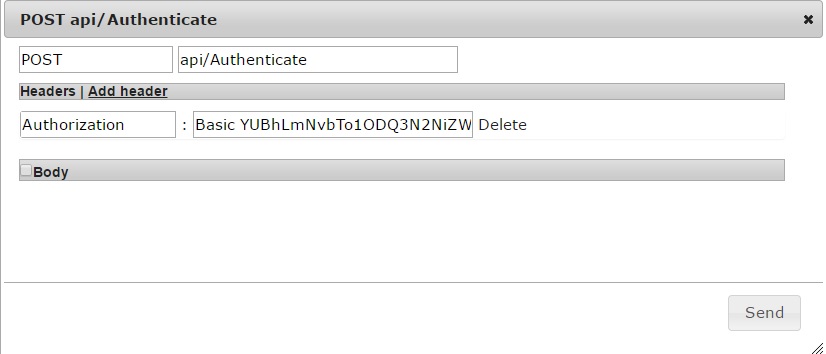
- The request body will return Authorized if succesful
-
There will be two headers included in the request:
-
Token - This is the token you will use to access all the other API methods
You will need to store this temporarily in your application -
TokenExpiry - This is the time that your current token expires
Once your token expires you will need to run the authentication method again to produce a new token
-
Token - This is the token you will use to access all the other API methods
Calling Methods
Once you have your token you can access the other methods on the API.
- Just add a header called "Token" onto your request and set the value to your API token
- You can use the test client (bottom right of page) on each of the methods over on the help page
Test Client
Please enter your details below and we will show you the calculation
Hashing Test Form
Examples
Jquery
 $('#submit').click(function () {
        //get email and password from fields
        var pw = $("#password").val();
        var eml = $("#email").val();

        //calc the md5 and base64 values
        var md5 = $.md5(pw)
        var emailAndHash = eml + ':' + md5;
        var credentials = btoa(emailAndHash);

        //send a post to the api using credentials
        CallAPI(credentials)
});


function CallAPI(credentials) {
    $.ajax({
        type: 'POST',
        url: '/api/Authenticate',
        headers: { 'Authorization': 'Basic ' + credentials }
    }).done(function (data, txtStatus, request) {
        if (data == "Authorized") {
            var token = request.getResponseHeader('Token');
            var expires = request.getResponseHeader('TokenExpiry');
            alert('your token is ' + token);
            alert('your expiry is ' + expires);
        } else {
            alert(data);
        }
    }).error(function (jqXHR, textStatus, errorThrown) {
        alert(errorThrown);
    });
}